SwiftUI 基础交互控件
导航页面跳转
导航页面(NavigationView)的点击(NavigationLink)后跳转至另一个页面。
样例代码:
//NavigationView 的点击事件与 NavigationLink 的跳转绑定
NavigationView {
    //NavigationLink 的跳转目标,也是一个View. 这里是 LandmarkDetail
    //创建 NavigationLink 的第二个参数,closure 返回的View 就是可点击的区域
        NavigationLink(destination: LandmarkDetail(landmark: landmarkData[0])) {
            Text("hello22").background(Color.red)
        }
    //在 NavigationView 里可以创建多个 NavigationLink,跳转到不同的页面
    NavigationLink(destination: LandmarkDetail(landmark: landmarkData[1])) {
            Text("hello22").background(Color.red)
        }
}
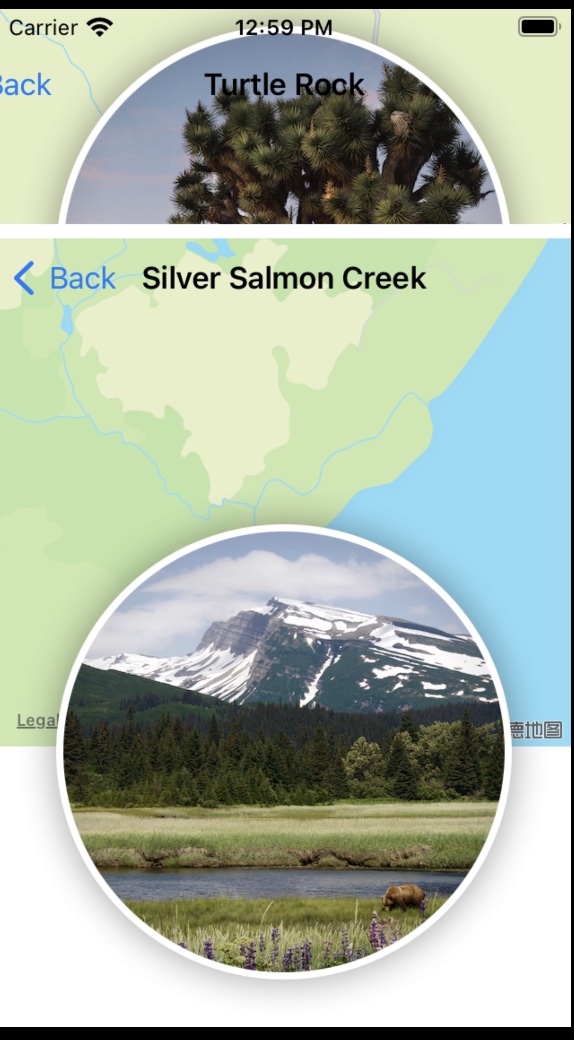
PS:页面跳转区域是该NavigationView 的区域,界面里可以有多个NavigationView,分别进行跳转。
参考截图:
弹出窗口(Present)
同 presentViewController 用一个 Binding 来控制弹出时机。
@State var showingProfile = false
//当 showingProfile 为true时,触发present
.sheet(isPresented: $showingProfile) {
        //返回 present出来的view
                ProfileHost()
                    .environmentObject(self.userData)
}
//将 showingProfile 设为false,能dismiss对应的present view
开关控件Toggle(UISwitch)
可以绑定一个声明为 @State 的Bool属性。
//绑定声明为 @State的对象的一个bool属性,该bool属性需要设置为 @Pubished
Toggle(isOn: $profile.isOn) {
         Text("Is He On:") //返回 左边订制的视图
}

日期选择器(DatePicker)
日期选择控件
DatePicker(
                    "Date Pick:",
                    selection: $profile.birth,
                    in: dateRange,
                    displayedComponents: .date)
